
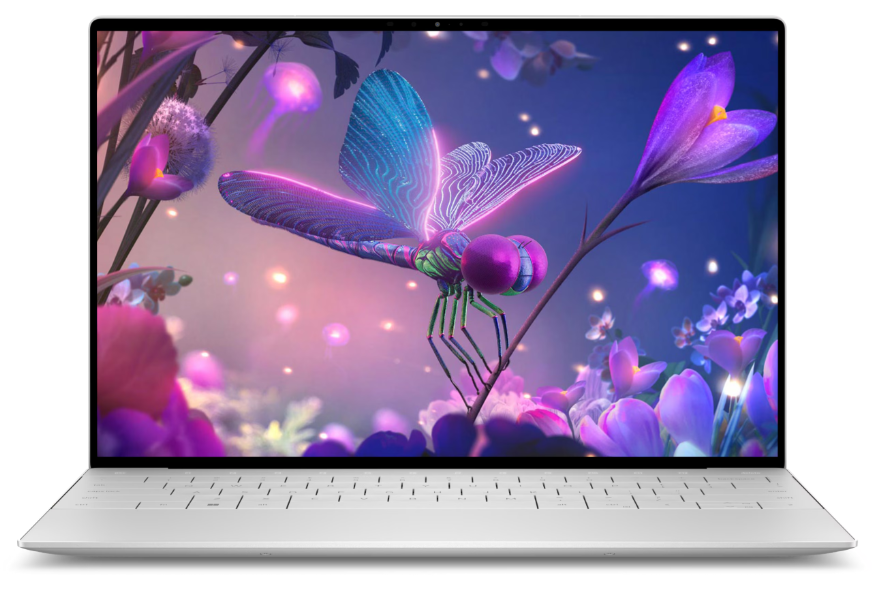
The Dell XPS 13 Plus redefines the modern laptop aesthetic with a bold, minimalist design that sacrifices nothing for style. It’s engineered for users who crave cutting-edge technology wrapped in a sleek, premium package, offering a perfect blend of portability and performance for the on-the-go professional.
⚙️ Complete Technical Specifications
| Category | Specifications |
| Display | 13.4-inch FHD+ (1920×1200) InfinityEdge Non-Touch, UHD+ (3840×2400) InfinityEdge Touch, or 3.5K (3456×2160) OLED Touch |
| Processor | Intel® Core™ Ultra 7 155H, Ultra 5 125H, or Intel® Core™ i7-1360P |
| Graphics | Intel® Arc™ Graphics (integrated with Core Ultra series) |
| Memory | Up to 32GB LPDDR5x RAM (soldered) |
| Storage | Up to 2TB PCIe 4 NVMe SSD |
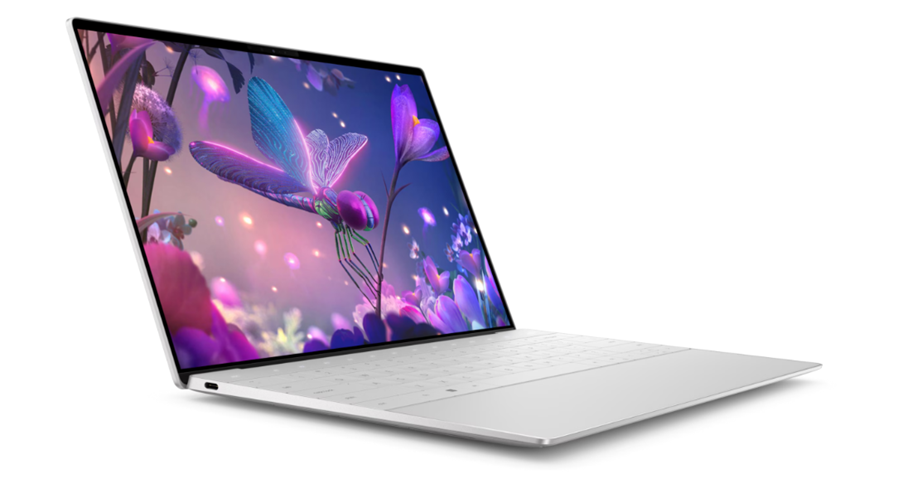
| Ports | 2x Thunderbolt 4 (USB-C) ports only (left side), 3.5mm headphone jack |
| Connectivity | Intel® Wi-Fi 6E, Bluetooth 5.3 |
| Audio | Stereo woofer and tweeter combo, Waves MaxxAudio® Pro, Dolby Atmos® |
| Camera | 1080p FHD RGB-IR camera with Windows Hello |
| Keyboard & Touchpad | Capacitive function keys, Zero-lattice keyboard, Seamless, haptic force feedback touchpad |
| Battery & Power | 55Whr battery, 60W or 100W USB-C Type-C power adapter |
| Operating System | Windows 11 Home or Pro |
| Weight | 2.71 pounds (1.26 kg) |
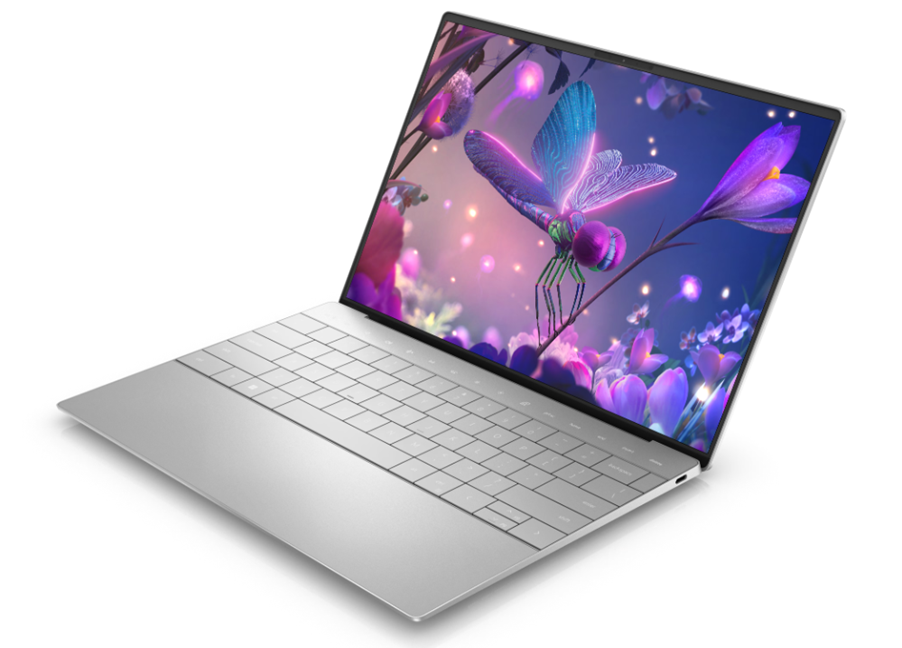
Tech Space of Dell XPS 13 Plus
- Processor
12th Generation Intel® Core™ i5-1240P (12 MB Cache, 12-Core, 1.7 GHz to 4.4 GHz)
12th Generation Intel® Core™ i7-1260P (18 MB Cache, 12-Core, 2.1 GHz to 4.7 GHz)
12th Generation Intel® Core™ i7-1270P (18 MB Cache, 12-Core, 2.2 GHz to 4.8 GHz)
12th Generation Intel® Core™ i7-1280P (24 MB Cache, 14-Core, 1.8 GHz to 4.8 GHz)
- Operating System
(Dell Technologies recommends Windows 11 Pro for business)
Windows 11 Pro, 64-bit
Windows 11 Pro National Education, 64-bit
Windows 11 Home, 64-bit
Ubuntu® 20.04 LTS, 64-bit
- Graphics Card
Integrated:
Intel® Iris Xe Graphics
- Display
13.4-inch, FHD+, 1920 x 1200, anti-reflective, anti-smudge, touch, 100% sRGB, 500 nits, 2,000:1 contrast ratio, wide-viewing angle, InfinityEdge, Eyesafe® low blue light Display Technology
13.4-inch, FHD+, 1920 x 1200, anti-glare, non-touch, 100% sRGB, 500 nits, 2,000:1 contrast ratio, wide-viewing angle, InfinityEdge, Eyesafe® low blue light Display Technology
13.4-inch, UHD+, 3840 x 2400, anti-reflective, anti-smudge, touch, 90% DCI-P3, 500 nits, 1,650:1 contrast ratio, wide-viewing angle, InfinityEdge, Eyesafe® low blue light Display Technology
13.4-inch, 3.5K OLED, 3456 x 2160, anti-reflective, anti-smudge, touch, 100% DCI-P3, 400 nits, 1,000,000:1 contrast ratio, InfinityEdge, Eyesafe® low blue light Display Technology

- Memory
8 GB, 4 x 2 GB, LPDDR5, 5200 MHz, integrated, dual-channel
16 GB, 4 x 4 GB, LPDDR5, 5200 MHz, integrated, dual-channel
32 GB, 4 x 8 GB, LPDDR5, 5200 MHz, integrated, dual-channel
- Storage
256 GB, M.2 2230, PCIe NVMe Gen3 x4, SSD
512 GB, M.2 2280, PCIe NVMe Gen3 x4, SSD, Self-encrypting drive
256 GB, M.2 2230, PCIe NVMe Gen4 x4, SSD512 GB, M.2 2280, PCIe NVMe Gen4 x4, SSD, Self-encrypting drive
512 GB, M.2 2280, PCIe NVMe Gen4 x4, SSD
1 TB, M.2 2280, PCIe NVMe Gen4 x4, SSD
2 TB, M.2 2280, PCIe NVMe Gen4 x4, SSD
- Color
Graphite
Platinum
- Microsoft Office
Foxit® PhantomPDF™ 30-day trial
Foxit® PhantomPDF™ Standard
Adobe® Acrobat® Pro
Adobe® Acrobat® Standard DC
Microsoft Office 30-day trial
Microsoft 365 Business
Microsoft 365 Business Premium
Microsoft 365 Family
Microsoft 365 Personal
Microsoft Office Home and Student 2021
Microsoft Office Home and Business 2021
Microsoft Office Professional 2021
CyberLink® PowerDirector® 17 Ultra
CyberLink® PhotoDirector® 10 Ultra
Cycberlink® Media Player with PowerDVD® 19
My Dell (Dell XPS 13 Plus)
Dell Digital Delivery
Dell Cinema Experience
Dolby Vision
Dell Cinema Sound / Waves
Dell Cinema Stream / Killer v2.3 or later
Dell Cinema Guide
Amazon Alexa
- Home and Small Business Security Solutions
Trusted Platform Module (TPM) 2.0 security
McAfee LiveSafe™ 12-month subscription
McAfee LiveSafe™ 24-month subscription
McAfee LiveSafe™ 36-month subscription
Facial recognition
Fingerprint reader
- Ports
2 x Thunderbolt™ 4 (USB Type-C™ with DisplayPort and Power Delivery)
USB-C to USB-A 3.0 adapter (included in the box)
USB-C to 3.5mm headset adapter (included in the box)
- Optical Drive
No optical drive
- Slots
N/A
- Dimensions & Weight
Height : 0.60 in. (15.28 mm)
Width: 11.63 in. (295.30 mm)
Depth: 7.84 in. (199.04 mm)
Starting weight: 2.71 lbs. (1.23 kg) for FHD+ or 4K+, 2.77 lbs. (1.26 kg) with OLED
- Camera
720p at 30 fps HD RGB camera, 400p at 30 fps IR camera, dual-array microphones
- Audio and Speakers
Dual stereo speakers (tweeter + woofer), Realtek ALC1319D, 2 W x 2 = 4 W total
- Chassis
Exterior Chassis Materials
Aluminum
- Wireless
Intel® Killer™ Wi-Fi 6E 1675 (AX211), 2×2, 802.11ax, Bluetooth® wireless card
- Primary Battery
3-cell, 55 Wh “smart” lithium-ion, integrated
- Battery Life
Up to 14 hours with FHD+ touch
- Regulatory
Product Safety, EMC and Environmental Datasheets
Dell Regulatory Compliance Home Page
Dell and the Environment
🎯 Dell XPS 13 Plus is Best For
This laptop is tailored for users who prioritize design and a premium experience:
- Executive Professionals & Business Travelers: Its sleek look and compact form factor make a statement and are easy to carry.
- Ultrabook Enthusiasts: Users who want one of the most modern and aesthetically forward designs on the market.
- Content Consumers & Light Creators: The stunning OLED display option is perfect for watching media and light photo editing.
- Students in Design/Tech Fields: For those who appreciate tech innovation and need a portable, powerful machine for coding and design software.
✨ Key Features Explained of Dell XPS 13 Plus
- Sleek, Minimalist Design: The XPS 13 Plus features a “zero-lattice” keyboard that extends edge-to-edge, an invisible haptic touchpad, and capacitive touch function keys, creating a seamless and futuristic look.
- Vibrant Touchscreen Options: The available 3.5K OLED display delivers incredibly deep blacks, vibrant colors, and high contrast, making it one of the best screens on a 13-inch laptop.
- Powerful Intel Core Ultra CPUs: The latest Intel Core Ultra processors with integrated Arc Graphics provide solid performance for productivity and creative tasks, along with improved AI capabilities.
- Compact and Lightweight: Weighing just 2.71 lbs, it’s designed for maximum portability without sacrificing screen size or performance.
- Advanced Cooling System: A dual-fan cooling system ensures the laptop maintains performance under load, which is crucial in such a thin form factor.
💰 Pricing of Dell XPS 13 Plus (Approximate U.S. Market)
- Base Model (Core i5/i7, 8GB RAM, 512GB SSD, FHD+): Starts at $1,099 (often on sale)
- Mid-Range Config (Core Ultra 7, 16GB RAM, 1TB SSD, UHD+ Touch): Around $1,699
- High-End Config (Core Ultra 7, 32GB RAM, 2TB SSD, 3.5K OLED Touch): Around $2,199
✅ Pros & ❌ Cons of Dell XPS 13 Plus
| ✅ Pros | ❌ Cons |
| Stunning, innovative design stands out from competitors | Limited port selection – only two Thunderbolt 4 ports |
| Beautiful OLED display option with incredible color | Haptic touchpad has a learning curve and isn’t for everyone |
| Excellent build quality with premium materials | Capacitive function keys lack tactile feedback |
| Very compact and highly portable | Soldered RAM means no future upgrades |
| Good performance for everyday productivity tasks | Battery life is average, especially with the OLED display |
🏁 Final Verdict of Dell XPS 13 Plus
The Dell XPS 13 Plus is a statement piece. It’s for the user who values design innovation and a premium, minimalist aesthetic as much as they value performance.
Who should buy it? If you are a style-conscious professional, a frequent traveler who wants a gorgeous and portable machine, or a tech enthusiast who loves cutting-edge design, the XPS 13 Plus will not disappoint. It’s a head-turner that packs enough power for most business and creative tasks.
Who should skip it? Users who need practical connectivity (like USB-A or HDMI ports without dongles), prefer traditional tactile keyboards and touchpads, or need all-day battery life for travel should consider more conventional ultrabooks like the HP Spectre x360 or the standard Dell XPS 13.
The Bottom Line: The XPS 13 Plus is a bold and beautiful experiment in laptop design. It sacrifices some practicality for aesthetics, but delivers an unmatched, futuristic user experience for those willing to adapt.
To Buy Click Here Dell XPS 13 Plus
Explore More Apple MacBook Pro 16-inch (M3 Pro/Max) – The Creative Powerhouse


One Comment